
Contents
MCP and an API can intervene in the same connection between an AI agent and a CRM. The CRM's API provides access to the application's functions. MCP provides a protocol to present tools and context to the application hosting the agent. An MCP server can call this API. The architecture choice must specify permissions, returned data, and actions that require approval.
Track a request to the CRM
Imagine an employee asks: "Find this client's file and prepare an address update." The system must identify the right client, read the necessary information, produce a proposal, and then have the modification validated. An understandable conversation does not prove that the correct CRM line was chosen.
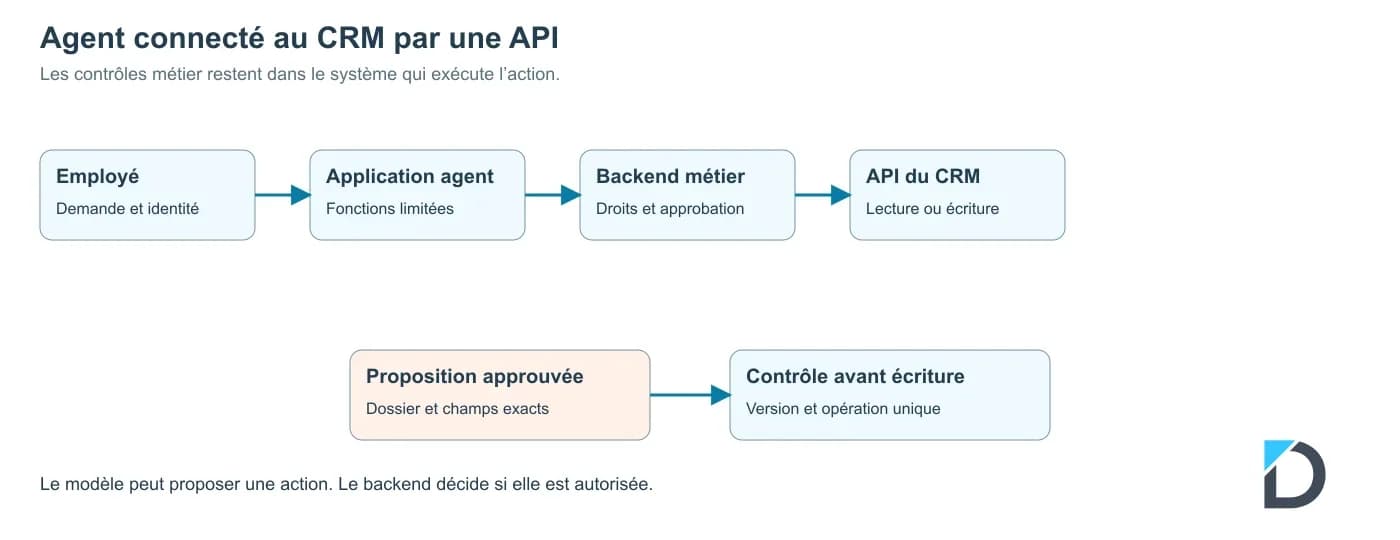
In a direct integration, the agent application calls a function defined by your team. This function checks the parameters and uses the CRM API. The application controls access, errors, and the result returned to the model. You choose exactly which operations are exposed.
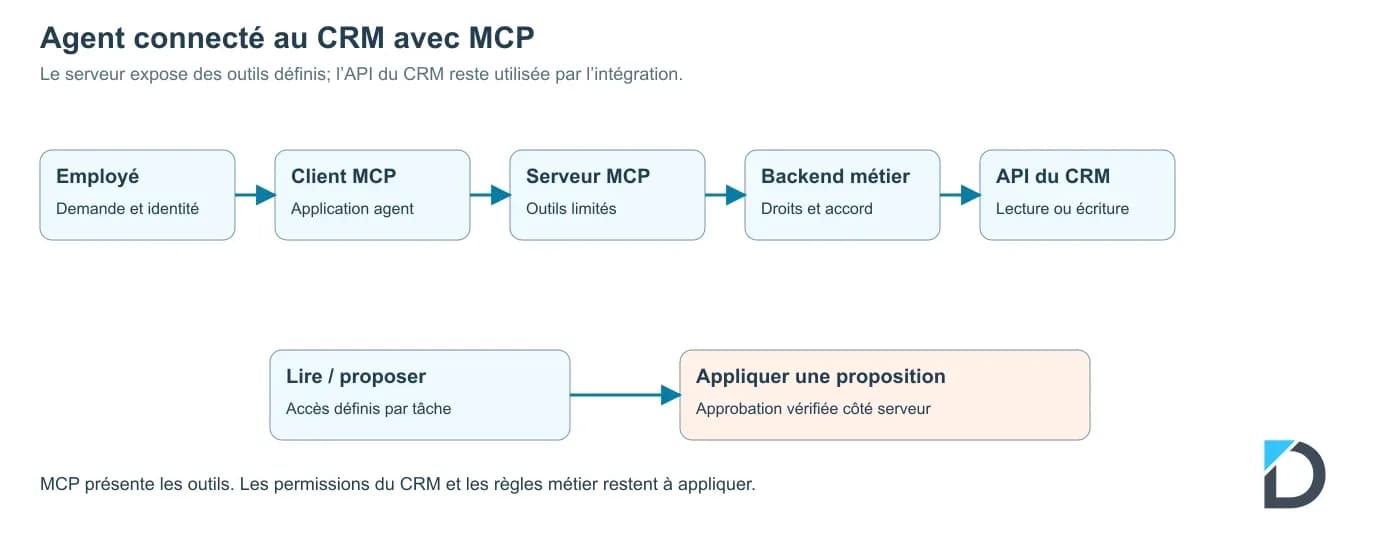
With MCP, the application uses an MCP client to communicate with a server that exposes tools. The server can then call the CRM API. The official presentation of MCP describes this connection and the resources a server can provide. The protocol adds a common interface; the CRM business rules and its access rights still need to be enforced.
The direct path is: employee, agent application, controlled business function, CRM API. The path with MCP is: employee, application with MCP client, MCP server, controlled business function, CRM API. In both cases, place write control on the system executing the action.
IllustrationDirect connection of the agent application to the business backend and then to the CRM API · shareable block
IllustrationConnection of the MCP client to the MCP server, then to the business backend and CRM API · shareable block
Decide which operations to expose
An operation called 'manage clients' gives too little information about its effect. Prefer separate tools: search for a client, read certain fields, prepare a modification, and apply an approved proposal. The MCP documentation on tools presents the descriptions and diagrams of tools. Your design must add the business-specific limits.
For a search, define the accepted parameters and the maximum number of results. For a modification, request the file identifier, the targeted fields, and the reference of the approved proposal. The server verifies this reference at the time of writing. A field "approved: true" freely sent by the model does not constitute proof of approval.
TableOperation · shareable block
| Useful access | Recommended control | |
|---|---|---|
| Search | Identity and contact reference | Filtering by user, limited result |
| Read | Fields necessary for the task | Control of the file and allowed fields |
| Propose | Draft of changes | Comparison with current values |
| Apply | Explicitly approved fields | Server authorization and still valid approval |
| Delete | No access in this driver | Separate procedure reserved for a manager |
In this example, the agent can prepare a corrected address. They cannot change the credit limit or delete the client. These restrictions must hold even if the read document contains an instruction requesting otherwise. The data of a tool are information to be processed, with a defined level of trust.
Compare direct integration and MCP
Direct integration is suitable when you control an application and a small number of functions. It can simplify driver dependencies. MCP is worth considering when the same set of tools must serve multiple compatible applications, with an interface maintained separately.
TableCriterion · shareable block
| Direct API integration | Exposure via MCP | |
|---|---|---|
| Interface used by the agent | Functions specific to your application | Tools exposed according to MCP |
| Reuse | Possible adaptation for each application | Reuse by compatible clients to be verified |
| Operations | Application and CRM connection to maintain | MCP server and CRM connection to maintain |
| Permissions | Controls in the backend and the CRM | Controls in the server, the backend, and the CRM |
| Choice of driver | Few tools, single application | Several clients or shared tools |
Compatibility must be verified based on the versions and transports actually used. A server listed in a catalog is not automatically suitable for your CRM or access policy. Verify its origin, maintenance, and the operations it exposes before connecting a business account.
The MCP documentation on authorization specifies the protocol mechanisms. Your application still needs to determine who can view which file and under what circumstances a modification is allowed. An authenticated connection may carry rights that are too broad for the requested task.
Preserve approval and change traceability
The employee must see the relevant file, the current values, and the proposed values. After their agreement, the executor checks that the file has not changed since the proposal. If someone else has modified the address in the meantime, request a new validation. This rule prevents overwriting more recent work.
Keep a trace linking the request, useful readings, the proposal, and the write. Limit the personal data contained in the logs. To investigate an error, the team must be able to find the operation and its decision without creating multiple full copies of the file.
Prepare for recovery after a network delay. Before retrying a modification, check its status with an operation identifier. Also define how to suspend writes while retaining, if necessary, authorized viewing. The API integration between CRM, accounting, and store guide elaborates on synchronization issues between systems.
Test the architecture on a limited task
For testing, use a trial account and two users with different permissions. Ask the second user to read a folder reserved for the first. Also try an out-of-scope modification, a refusal to approve, and a proposal that has become outdated. The action must be controlled in the execution system, even when the model makes a convincing request.
These tests complete the verification of the agent's responses. Our guide on AI agent security covers risks related to tools and external content. To scope the connection to the CRM, the CRM and ERP automation service allows defining the useful operations before choosing the protocol.
Frequently Asked Questions
Does MCP replace the CRM API?+
An MCP server can use the CRM API to execute its tools. The API then remains the access path to data and operations. MCP organizes how the agent application discovers and calls the exposed functions.
Is MCP sufficient to secure an integration?+
The protocol provides interconnection and authorization mechanisms. Security also depends on the server, CRM permissions, and your business controls. Verify access and actions with tests independent of the model's response.
Is approval in the agent's message sufficient?+
The executor must verify approval from the authorized path and corresponding to the proposed changes. A model may produce an approval field or sentence; this output alone does not prove user consent.
Should MCP be added to the first pilot?+
Add it when reusing tools or compatible clients justify this layer. For a single application with a few operations, also compare with a direct integration. The decision must take into account operation after the pilot.
Audit your agent's connections
Describe your process and the tools used. Daillac will be able to define the scope, access, and acceptance criteria for a pilot.
D